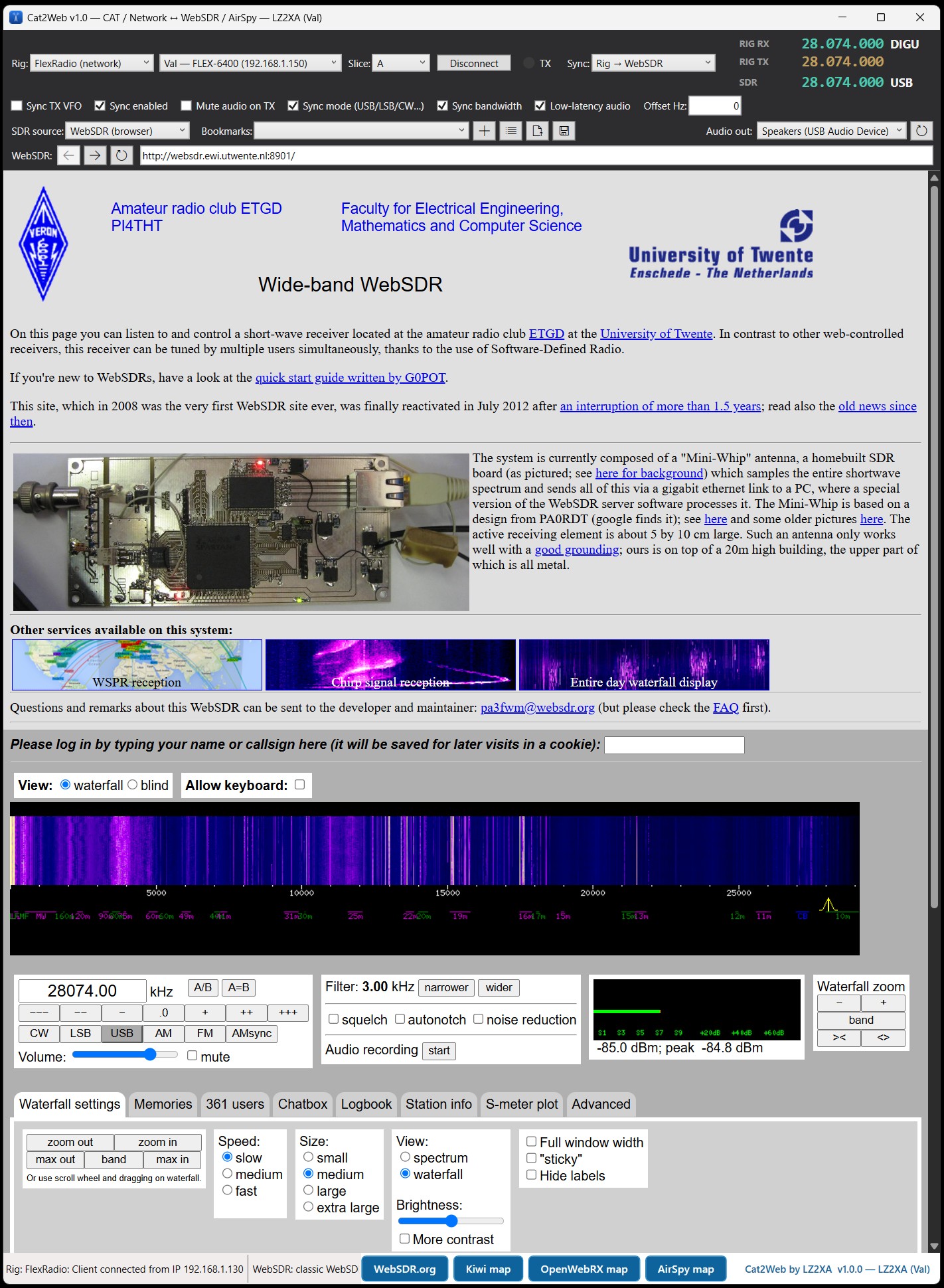
Keep your transceiver and any public SDR perfectly in step. Tune the rig — the SDR follows. Click the waterfall — the rig retunes. Frequency and mode, both ways.
⊞ Windows 10 / 11 only
Everything a classic CAT-to-WebSDR tool does — plus a few things they don't.
UberSDR is the fastest-growing new wave of wideband web receivers — RX-888 direct-sampling hardware on ka9q-radio. Cat2Web is one of the first CAT tools to drive it: full two-way frequency, mode and filter sync, auto-mute on transmit and audio-device routing, exactly like WebSDR. A built-in UberSDR map button opens the public instance directory — click a receiver and it opens right inside Cat2Web.
Beyond the browser SDRs, C2W talks the native SpyServer (Airspy) protocol directly — Airspy R2 / Mini / HF+. It pulls the IQ stream, demodulates and plays the audio itself, with no browser involved: lower latency and rock-solid sync. No other CatSync-style tool does this.
Control a FlexRadio 6xxx / 8xxx directly over your LAN through the SmartSDR TCP API. C2W discovers the radio automatically (UDP broadcast) — no serial cable, no virtual COM ports, no OmniRig needed for Flex.
And with Flex it syncs the filter bandwidth too — not just frequency and mode. Narrow down on the rig and the receiver follows the exact passband width.
Expert Electronics rigs — SunSDR2 / DX / PRO and MB1 — speak the TCI protocol over the network. C2W drives their frequency and mode straight through TCI, no CAT cable and no COM port — a dedicated network backend alongside FlexRadio's.
Send the WebSDR receive audio to any sound device on your PC — headphones or a second interface. Not just the default output.
Cat2Web is under active, ongoing development: new SDR types keep being added (UberSDR is the latest) and improvements ship as frequent, free updates. A one-click in-app updater keeps you current, and your settings and license carry over. Buy once — the lifetime license includes every future update.
Cat2Web recognises the receiver type on its own — open any of these and it just works.
The original multi-user WebSDR servers (like the University of Twente). Full frequency, mode and audio control.
The worldwide KiwiSDR network — hundreds of public receivers, tuned straight from your rig.
The open-source web SDR, including the popular OpenWebRX+ fork.
The new-generation RX-888 / ka9q-radio web receivers — auto-detected and tuned straight from your rig, with a built-in map of public instances.
Native protocol with no browser at all — Airspy R2 / Mini / HF+ direct, for the lowest latency.
If you can’t always hear the band from home, Cat2Web lets a remote receiver do the listening while you stay on your own rig.
City QTH drowning in noise? Let a quiet remote WebSDR do the receiving while you transmit on your own radio.
Track your TX VFO to hear exactly where a DX station is listening, then drop right in.
Follow a net on a clear remote receiver even when your own antenna can’t quite pull it in.
Check your own signal and audio from the other side of the world, in real time.
Cat2Web is a Windows app that links a real transceiver with public SDR receivers — the browser-based ones (classic WebSDR, KiwiSDR, OpenWebRX / OpenWebRX+ and the new-generation UberSDR) and, uniquely, native SpyServer (Airspy) receivers with no browser at all. Listen to how you sound on the air from the other side of the world, or spot on your own frequency — all kept in sync automatically.
Rig → WebSDR, WebSDR → Rig, or fully bidirectional. Frequency and mode (CW / USB / LSB / AM / FM …) stay matched, with echo suppression so the two never fight.
Follow your receive or your transmit frequency — so you can hear your own signal on a remote WebSDR even when working split.
The WebSDR audio is muted while you transmit — no feedback howl — then comes back the moment you stop.
An embedded Chromium browser (WebView2) opens the receiver page and recognises the SDR type on its own — no per-site setup.
Works with any rig OmniRig supports — the CAT standard thousands of hams already use — polled smoothly in the background.
Run it from a USB stick with its own settings, or install normally. No account, no cloud — everything stays on your PC.
CATSync pioneered this idea back in 2018 and still does the core job well. Here is where Cat2Web does the same thing, and where it goes further.
| Feature | Cat2Web | CATSync 1.31 |
|---|---|---|
| Browser-based receivers | WebSDR, KiwiSDR, OpenWebRX / OWRX+, UberSDR | WebSDR, KiwiSDR, OpenWebRX |
| Native SpyServer (Airspy) receiver — no browser at all | ✓ direct IQ stream, built-in demodulator | — |
| CAT control through OmniRig | ✓ | ✓ |
| FlexRadio 6xxx / 8xxx over the network | ✓ SmartSDR API, auto-discovery, no cable | — |
| SunSDR / Expert Electronics over TCI | ✓ TCI, no cable | — |
| Filter bandwidth follows the rig | ✓ with FlexRadio | — |
| Bidirectional — click the waterfall, the rig retunes | ✓ | ✓ full version |
| Receiver audio muted while you transmit | ✓ | — |
| Choose which sound device plays the audio | ✓ | — |
| Portable — runs from a USB stick | ✓ | — |
| Licence | €20 once, lifetime, no machine lock | €9.95 once (v1.31) |
| Operating system | Windows 10 / 11 | Windows |
“—” means the feature is not listed on CATSync’s own feature page, checked in September 2026. CATSync is an independent product by another author and it is the cheaper of the two. Cat2Web has a free demo, so the honest way to compare is on your own station.
The demo is fully functional for a limited trial period. Unlock the full app for good with a single license.
After payment you enter your callsign; your personal license key is emailed to you (usually within a few hours). The key carries your callsign and your name, and the app shows both. Prices include any applicable VAT.
No account, no server check — activation is a single key you paste into the app.
Grab the free demo for Windows 10/11 — fully functional for a limited time — and try it with your rig and any WebSDR.
Pay €20 once and enter your callsign at checkout.
Your personal license key arrives by email, keyed to your callsign and name.
Click “Enter code” in the app, paste the key, press Activate. Done — offline, forever.
Fully functional for a limited trial period — no features locked.
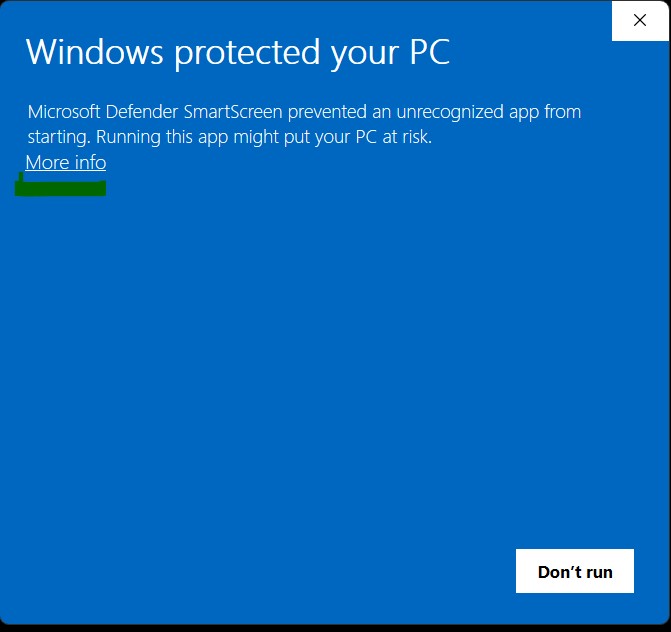
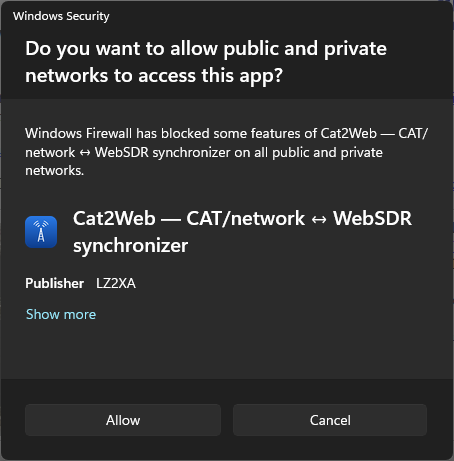
The download is a .zip with a single C2W.exe inside — unzip it first; there is no installer. The very first time you open it, Windows may show two safe, one-time prompts: SmartScreen (the app isn’t code-signed yet) and the Firewall (C2W needs the local network for FlexRadio and SpyServer). Just allow both — they won’t appear again.
Yes — the demo is fully functional for a limited time, so you can confirm everything works with your setup before you buy.
Yes. Cat2Web does the same core job — keeping your transceiver and a public WebSDR in sync — and adds native SpyServer (Airspy) support, FlexRadio and SunSDR (TCI) network control, filter-bandwidth sync and audio-output routing. If you’ve used a CatSync-style tool you’ll feel right at home; the free demo lets you compare on your own station.
No. It's a single one-time payment of €20 for a lifetime license, including future updates.
Just ask — the key is generated from your name and callsign, so the exact same key can be re-issued to you free, any time. There's no database and no reinstall limit.
Yes. The license isn’t tied to a machine and there’s no activation server — the same key works on any PC. It’s kept as a small license.key file next to the app (or in %APPDATA%), so if you run C2W portably from a USB stick it stays activated wherever you plug it in. On a new PC without that file, just paste your key once.
The browser SDRs — classic WebSDR, KiwiSDR, OpenWebRX / OpenWebRX+, and UberSDR (auto-detected per page) — plus native SpyServer (Airspy R2 / Mini / HF+) receivers with no browser.
Almost any modern rig. FlexRadio 6xxx / 8xxx are controlled directly over the network; every other transceiver goes through OmniRig, the widely-used CAT engine. If OmniRig can talk to your rig — essentially all current Icom, Yaesu, Kenwood, Elecraft and many more — it works with Cat2Web. OmniRig is configurable too, so less common rigs can be added via its rig-definition files. SunSDR / Expert Electronics rigs also have a dedicated network backend over the TCI protocol.
Yes. C2W controls the rig through OmniRig, which several programs can share at once — so your logger and Cat2Web can both talk to the same radio at the same time. If your station uses a single CAT COM port, a port splitter such as VSPE lets multiple apps share it. FlexRadio’s network control likewise allows several clients at once.
No. Any transceiver supported by OmniRig works over CAT. FlexRadio network control is an extra option for those who have one — no CAT cable required.
Every Cat2Web release, newest first. Updating just means replacing your C2W.exe — your settings and license are kept.
Out-of-range warning fixes for one-way Rig → SDR sync: changing band on the rig no longer flashes a false “out of range” while the receiver catches up — the warning only appears if it really stays off the frequency for a few seconds. And if it does fire on a band the receiver can't reach, returning to a covered band now clears it right away instead of leaving it blinking.
Tidier bottom bar: the five separate SDR-directory buttons (WebSDR, KiwiSDR, OpenWebRX, UberSDR, AirSpy / SpyServer) are now one compact “SDR maps” dropdown. Pick a directory and it opens as before — the strip is cleaner and less crowded.
Tuning on the SpyServer spectrum/waterfall now feels natural: move the mouse over the display and scroll to step along the band (no click needed, and the step scales with the SPAN zoom), while the spectrum and frequency scale glide along so you can feel yourself moving across the band. Drag and scroll tuning are smooth now — no trembling or snapping back near the edges, and scroll goes the right way. Audio is louder at full gain (on par with SDR#) with a tighter AGC, the receive filter is even sharper, and the SpyServer strip is tidier (the duplicate RF Gain and AGC controls are gone).
The SpyServer screen gets an SDR#-style spectrum + waterfall display: a live spectrum graph over a scrolling waterfall, a red line on your receive frequency, the filter passband shown, and a frequency scale. Click or drag the display to tune (the rig follows in two-way sync), with an optional wide “Band view” of the whole band. And the receive filters are much sharper now (~100 dB) — strong adjacent signals no longer leak through a narrow CW/SSB filter.
One-click update: when a new version is out, the in-app banner's “Update now” button downloads, installs and restarts Cat2Web for you — no more unzipping and replacing C2W.exe by hand. Your settings and license are kept.
Cat2Web now supports UberSDR — the new RX-888 / ka9q-radio web receivers — with full two-way frequency, mode and filter sync, just like WebSDR, KiwiSDR and OpenWebRX. A new UberSDR map button opens the public instance directory; click a receiver to open it right in Cat2Web.
Two fixes: Cat2Web now reopens on the SpyServer you were last listening to, instead of jumping back to the previous WebSDR. And editing a bookmark's name or address now shows in the Bookmarks list right away, not only after a restart.
SpyServer gets a live waterfall (work in progress — it shows around the tuned frequency for now) and a LAT slider to dial the audio delay right down. SpyServer latency is now much lower and steady, and the Low-latency mode for WebSDR / KiwiSDR / OpenWebRX was tightened for noticeably less delay.
SpyServer gets a live info panel — mode, filter, data rate, server ping, connected users and a signal meter — plus RF gain and AGC right on the screen. The SpyServer filter now follows your rig, the audio is cleaner (16-bit when the server offers it), and a warning shows when a shared SpyServer is held by another user on a different band. Bookmarks also follow the open SpyServer.
New out-of-range warning: in one-way Rig → WebSDR sync a blinking alert shows when the receiver can't reach the radio's frequency. Importing bookmarks can now Replace your whole list (in the file's order) or Merge it in. And the Bookmarks selector always shows the receiver you currently have open.
Importing bookmarks now asks what to do when some entries already exist — update them from the file, keep the ones you have, or cancel. Nothing is overwritten or removed without asking.
KiwiSDR receivers that ask for a name or callsign before listening are now filled in automatically, so tuning and audio start right away without the extra screen.
The Back and Forward arrows now keep working after you open a receiver on a new server — including when that SDR is offline — so you can always step back to the previous one.
The in-app Download button now delivers the update as a .zip, which downloads cleanly — unzip it and replace your C2W.exe.
The dropped-connection alert now also catches a silent link loss — the radio powered off, or a network drop — noticing a dead FlexRadio link within about ten seconds.
New dropped-connection alert: Cat2Web watches the rig link and blinks the Connect button when it goes away, so you reconnect with one click.
Audio-output device selection now also works for a receiver opened directly from the KiwiSDR / WebSDR map or list.
Minor performance and stability improvements.
The update banner gained a direct Download button and a clear note that updating just means replacing C2W.exe.
Automatic update check on startup — a small banner links to the changes. It’s optional and sends nothing personal.
Per-receiver frequency offset, stored with each bookmark and re-applied when you select it. SunSDR (TCI) control confirmed on real hardware.
First public release — two-way sync with WebSDR, KiwiSDR and OpenWebRX / OpenWebRX+, native SpyServer (Airspy), FlexRadio network control, SunSDR (TCI), CAT via OmniRig, audio-output routing and an offline license.